
Recover Abandoned Carts Like A Pro Using Dynamic or Perpetual Timers
Improve the recovery rate of your abandoned carts by pushing urgency and displaying how long until cart items are returned to stock.
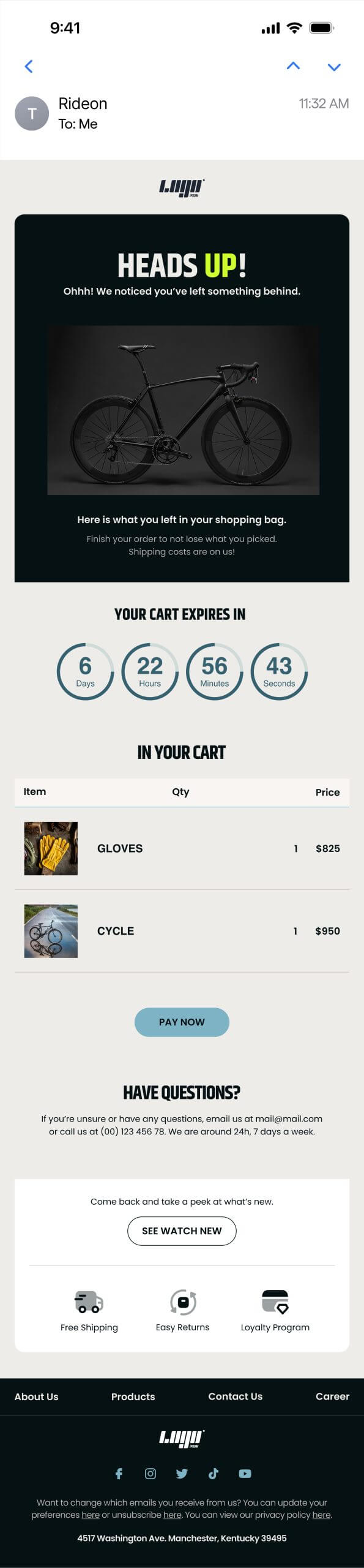
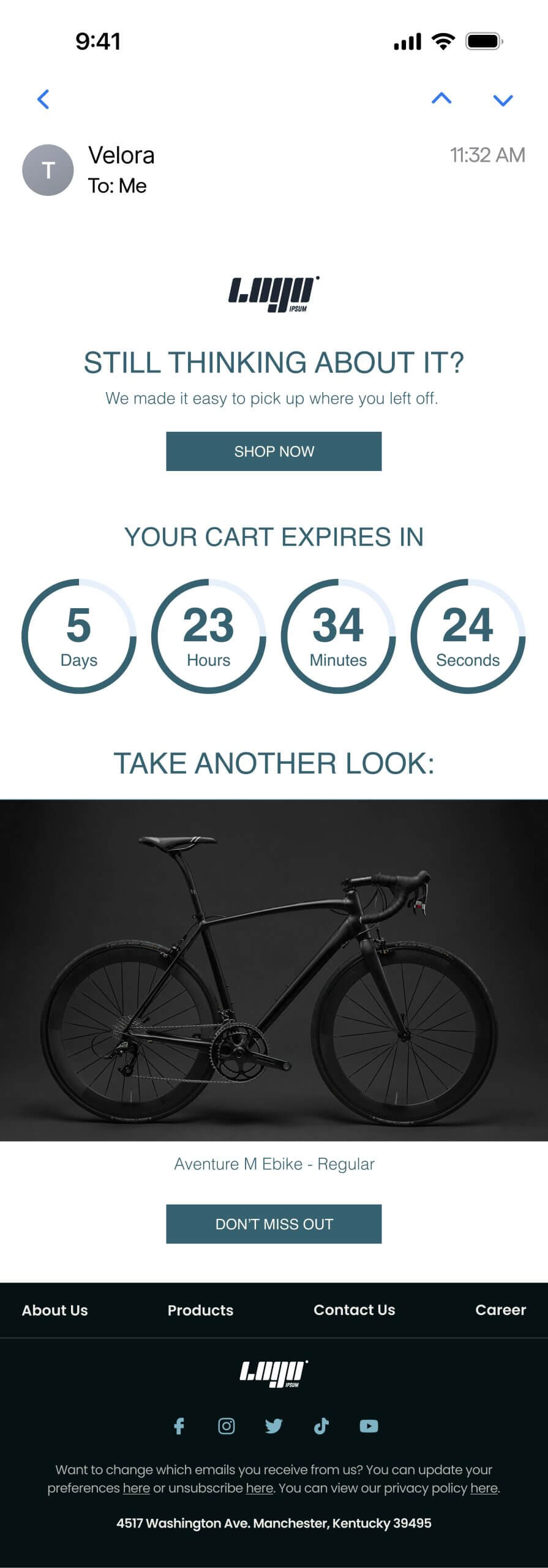
Dynamic and Perpetual Countdown Timers
Your clients are busy and get interrupted by thousands of distractions during checkout. But that doesn’t mean they didn’t want to buy. Abandoned cart emails are a crucial tool for ensuring you don’t miss out on this revenue, and there is no better way to improve their results then by using either a perpetual or a dynamic countdown timer.
More than 200,000 companies trust Sendtric












What are Perpetual and Dynamic Countdown Timers?
Perpetual Timers show the exact same time remaining every time the email is loaded
Let’s say you want your recovery email to always show 10 minutes remaining for a 5% extra discount code every time they open the email. Then you want to use a Perpetual timer in your email.
Dynamic Timers count down from a specified time stamp for a specific duration
Imagine that you keep stock reserved when it is in a customer’s cart for X amount of time and you want them to know that they only have a limited time before the reserved products get put back in stock (and potentially sell out!). Then you can specify a time stamp (the time they added to cart or began checkout) and how long you want the timer to count down for. This way whenever the user opens the email, it will show them exactly the time remaining before they potentially lose out on their favourite item!
Why Use Dynamic or Perpetual Timers with Abandoned Carts?
- Improve abandoned cart recovery rates.
- Add additional time limited discounts and urgency to your abandoned cart emails.
- Let the user know how long they have left to check out before reserved items get put back in stock.
- Ultimately increase the revenue you generate.

How to Use Perpetual & Dynamic Timers
How to add a Perpetual Timer to your Abandoned Cart Email
- Create a new timer in your Sendtric dashboard and select the Perpetual type.
- Enter how long you want the timer to countdown from each time it is opened.
- Copy and paste the HTML code to your email service provider’s HTML block (see setup guides if you need help).
- Watch your abandoned cart recovery rates jump sky high!
How to add a Dynamic Timer to your Abandoned Cart Email
- Create a new timer in your Sendtric dashboard and select the Dynamic type.
- Copy and paste the HTML code to your email service provider’s HTML block.
- Ensure you add the unix timestamp variable (a widely used timestamp normally used to record when a transaction action was done such as the ‘send time of an email’.
- Add the duration you want the timer to count down from to the code with a static number of seconds. For example, <UNIX_TIMESTAMP>+600 to countdown for 10 minutes (600 seconds) from the point of time at the specified timestamp.
Did You Know? We have Other Widgets
- Our Personalised Image Tool adds even more relevance to your campaigns.
- Include a live, accurate forecast in your email campaigns with our Weather Widget.
- Get to know your audience’s thoughts and opinions with our Polls For Emails widget.
- Our Digital Scratch Off feature can give your audience discounts and freebies.
Recover abandoned carts with urgency
Dynamic and perpetual timers add the thrill your customers enjoy when it comes to shopping. Sometimes we all need a little nudge to go for that treat and if you are not using timers in your abandon cart emails, you are missing out on revenue.
Why clients LOVE Sendtric...
“We couldn’t be happier with Sendtric. It allows us to add value to our customers and see the NPS go up. The countdown feature has been an invaluable tool to drive revenue for our customers. It adds a touch of personalized dynamism and urgency to our users’ campaigns, effectively motivating their customers to act promptly.”
Founder
Founder of WoowUp
“At Splio, we are thrilled to share how Sendtric has transformed customer engagement through its exceptional countdown feature. This powerful tool allows us to personalize our customers’ campaigns and instill a sense of excitement and urgency, driving the end-customers to take immediate action. With Sendtric, we have elevated our customer satisfaction. It’s very quick & simple to install together with Beefree, allowing us to generate instant value.”